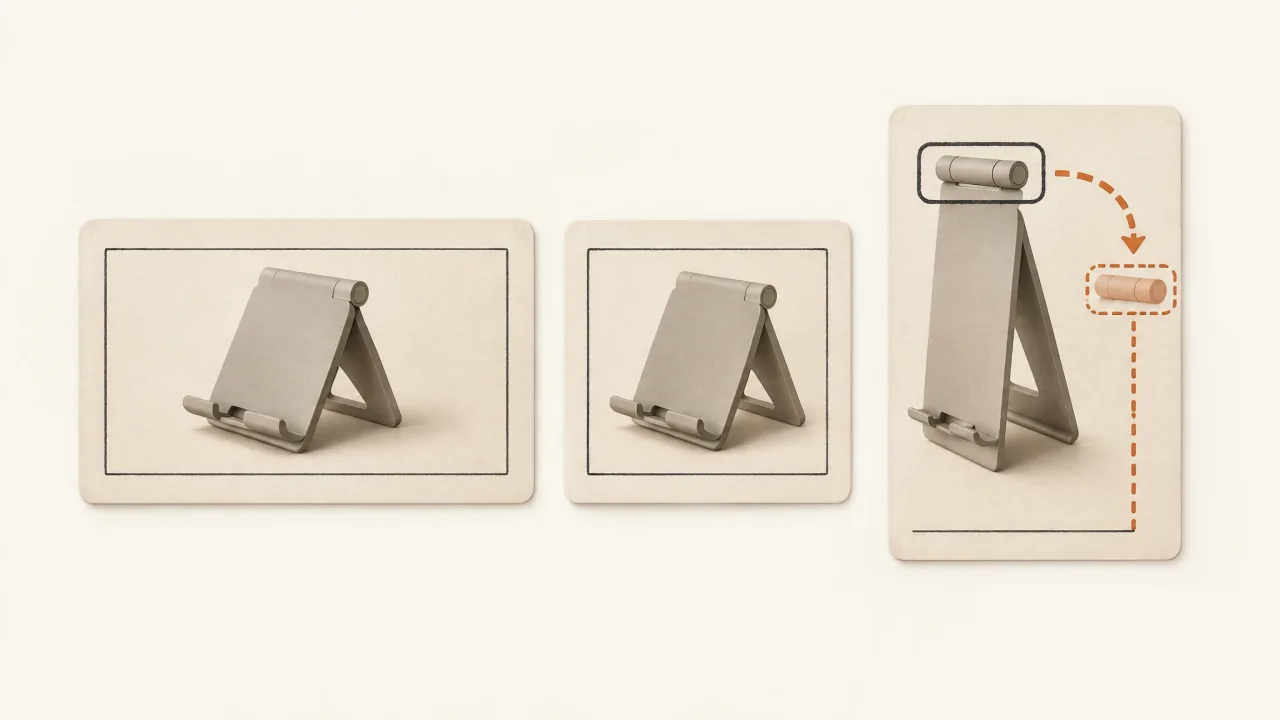
Work through placement versions shot by shot. Each destination needs to show the correct product, the essential action, and the necessary text. If they fit together, a crop may be enough. If the text gets in the way, reposition the overlays. When cropping would remove part of the demonstration, request a different composition or shot.
Even an accepted master can lose its meaning after an automatic adjustment. Use a crop-or-recompose decision sheet to record the work each destination needs.
Separate delivery settings from creative adaptation
Advantage+ placements lets Meta's delivery system select placements. Preparing media for those placements is a separate creative task, with its own decisions and acceptance criteria.
Meta's current aspect-ratio guidance supports square and 4:5 media for Feed and recommends 9:16 for Stories and Reels. It also advises checking the specific format's Ads Guide and reviewing automatic crops. Use those recommendations to start planning, then check whether the export fits each surface.
Ask the campaign owner to identify the intended placements and available customization controls. Name the required versions in the production brief. Supplying a portrait file alone won't restrict where Meta delivers it.
Mark the regions that carry each scene's meaning
For each shot, identify three regions:
- The identity region contains the silhouette, label, or distinctive part that identifies the correct product.
- The action region contains the hand, mechanism, contact point, and travel path needed to understand what happens.
- The message region contains necessary captions, category wording, or the invitation.
Look beyond the object's center. A tightening knob can sit at the edge while the product body occupies the middle. A crop that keeps the body may still cut out the action.
Before moving all the text into an already crowded frame, use the caption-hierarchy guide to decide which wording is essential.
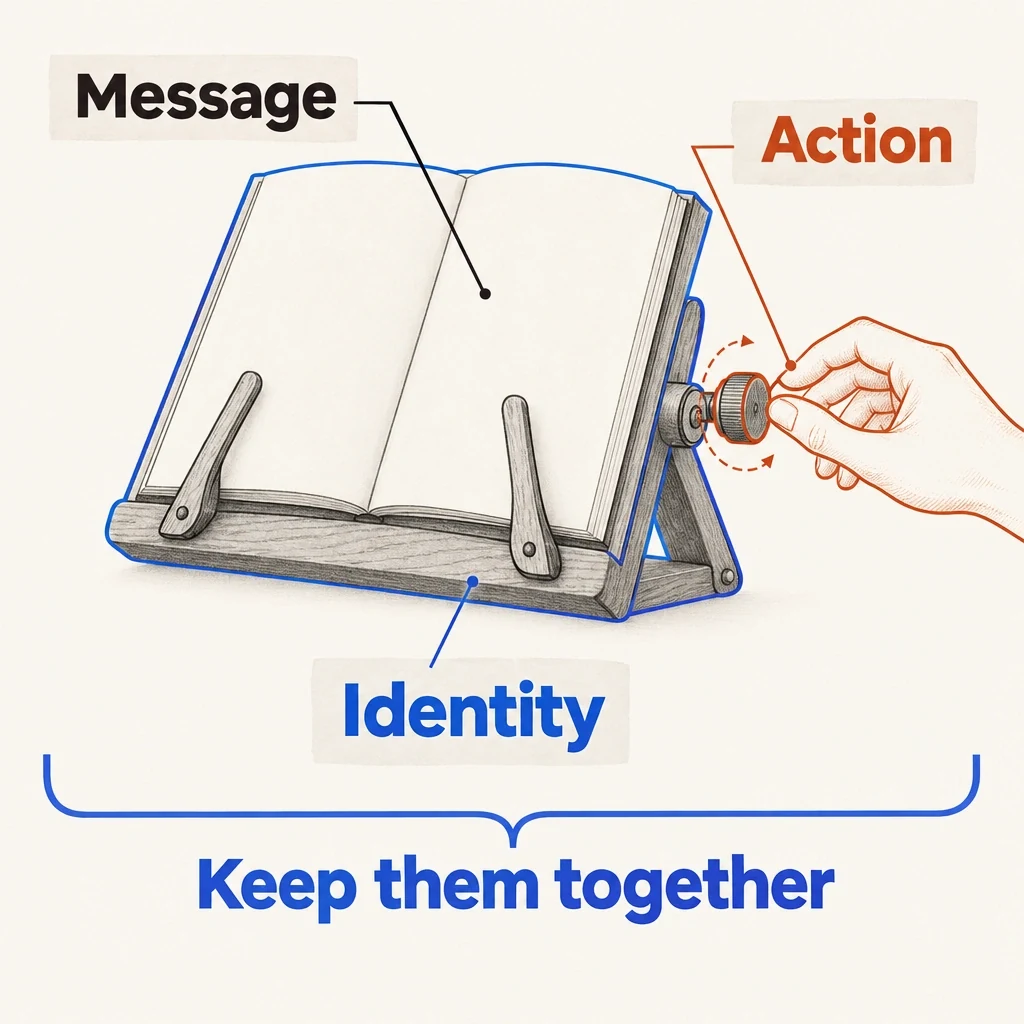
The product center is not the whole explanation
The fictional stand's framing needs to protect its identity, the complete action and essential wording together.
View full-size (opens in a new tab)Image explanation
- Identity includes distinguishing product details. Action includes the contact point and complete hand path. Message space includes necessary wording.
- Preserve those relationships throughout playback. A centered product or one universal margin cannot guarantee them.
Worked example: a folding recipe-book stand
Suppose you have an accepted tabletop video of a fictional wooden recipe-book stand with two page-holding arms and a locking hinge. For this exercise, assume you've supplied the master and reference images. There's no existing Fablo export behind the example.
The master has a wide kitchen introduction, a hand tightening the hinge knob, an overhead view of both page arms, and a product ending. Each shot needs a different decision:
- Crop the kitchen introduction. The counter extends beyond the stand, so a tighter Feed composition and a portrait crop can keep the stand and open book together. Remove spare background instead of shrinking the whole scene into a small inset.
- Reposition the crop during the knob action. A centered portrait crop would lose the hand entering from the right. Follow its actual path through the source and shift the framing so fingers, knob, and hinge stay visible throughout the action.
- Request a new composition for the page arms. The overhead source places them far apart across the book. A narrow crop loses one arm, while a loose fit makes both hard to inspect. An oblique view needs to show both arms and their contact with the pages in the intended frame.
- Adjust the layout of the product ending. Preserve the stand reference and exact "See the folding stand" invitation. Move the overlay into available space so it stays readable and doesn't cover the hinge.
The Feed and fullscreen versions may share an opening and ending but need different demonstration footage. Record that adaptation so the files' names aren't the only sign of what changed.
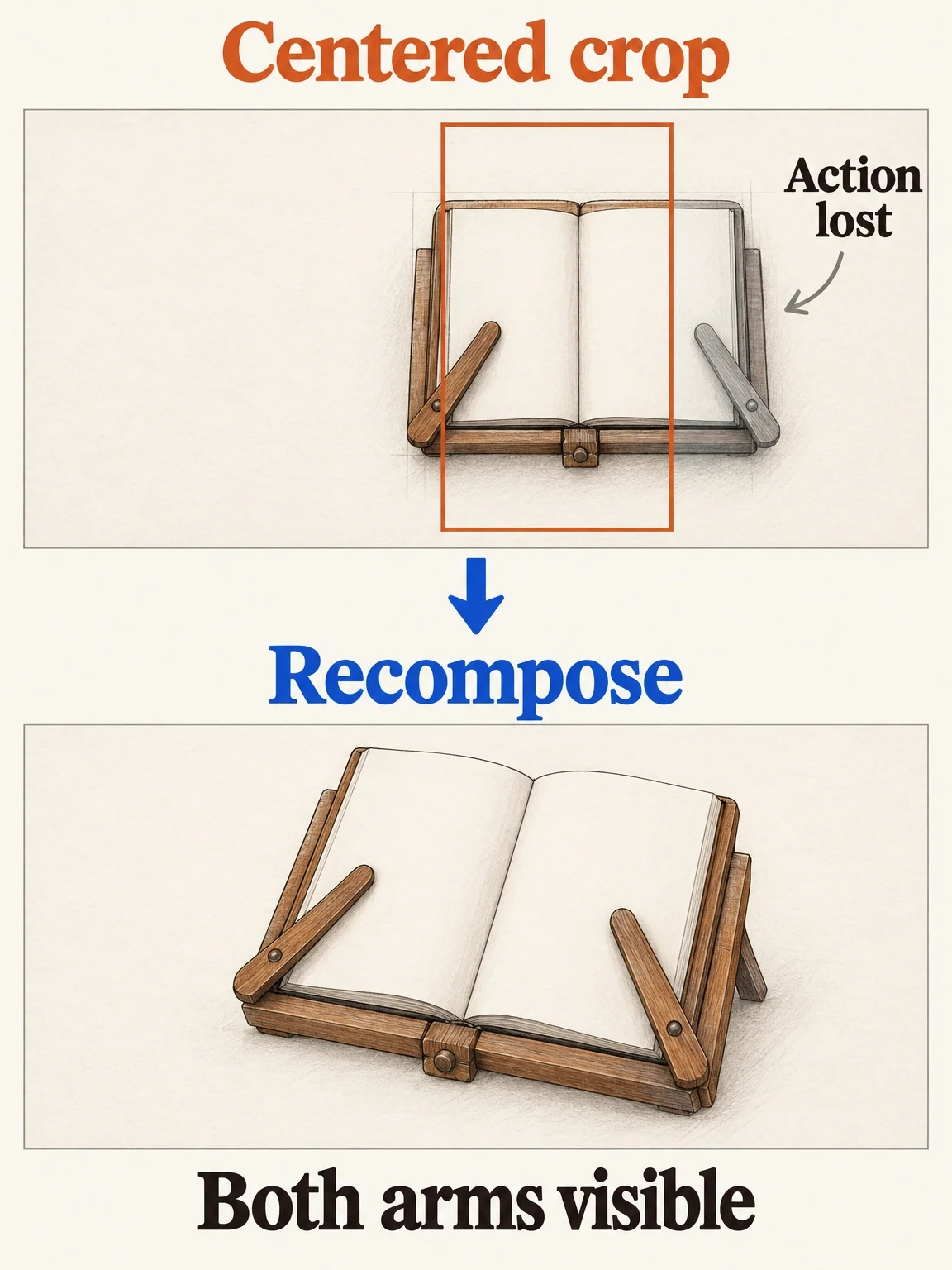
Keep the action, not just the center
The fictional stand needs both page-holding arms in view. When a crop loses that detail, the composition needs another look.
View full-size (opens in a new tab)Image explanation
- A centered portrait crop of the overhead source loses one of the fictional stand's two page-holding arms.
- An oblique composition must show both arms touching the pages. Check the actual export and placement preview.
Distinguish extra background from missing product action
Expanding the background can create room around the stand. It won't supply a hinge operation or hand movement missing from the source.
Check the other supplied takes before asking for a replacement shot. If none solves the problem, provide the product references and describe the missing view. Keep the accepted explanation and surrounding sequence where possible. Use the one-scene revision brief to keep the request focused.
Inspect any new composition on its own: check the arm count, hinge shape, page contact, and handling. Approval of the master doesn't cover newly made footage. The social-asset-bundle workflow brief can help you plan coordinated deliverables for different destinations.
Copy the placement-version review sheet
Repeat the scene fields for each requested destination. Record the planned decisions first, then keep findings from the actual export separate.
Create placement-specific versions of [accepted master and version].
Preserve the approved product message, offer, and destination.
Product authority: [exact variant and attached reference images].
Destination: [specific Feed / Stories / Reels placement and format].
Requested export: [ratio, dimensions, and approved runtime].

Scene: [source shot and actual interval].
Identity region: [the details that must remain recognizable].
Action region: [contact points and complete movement path].
Essential wording: [exact text and its communication role].
Decision: [crop / reposition / relayout / different supplied take / new shot].
Reason: [what would otherwise be lost or obscured].
Allowed change: [named framing or source change].
Protected material: [accepted action, audio, wording, or product view].

Review each complete version for joins, captions, sound, and ending.
Identify the returned files and any shots replaced.
Explain the scope and estimate before paid adaptation work.
My campaign owner will review the actual Meta placement previews.
Check the exports inside the current placement previews
Inspect each downloaded version on a phone and ask the campaign owner to check it in the actual ad previews. Meta's safe-zone guidance explains how interface elements and cropping can obscure important content, and describes a safe-zone guardrail in Ads Manager. Check the current preview for each format; a universal margin won't account for every layout.
Watch the action in motion. The thumbnail can't tell you whether the knob stays visible as the hand turns it. Check both arms remain recognizable and that the invitation stays readable through the ending.
Bring the sheet to the creative-revision workflow and open Fablo to produce your placement versions. Agree on the editing and new-shot scope before work starts. Use production checks to guide corrections, then select the final exports. For repeated adaptation work, review current plans against the mix of existing media and new shots you expect to need.