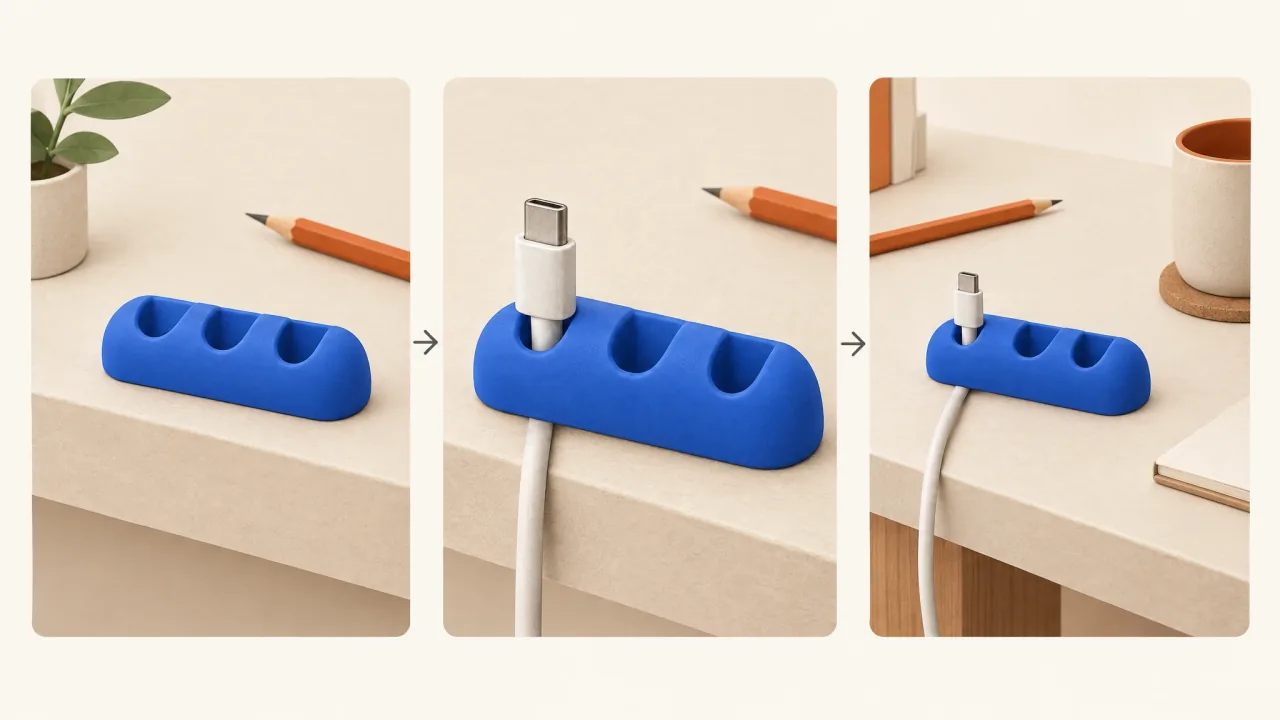
Product Ads takes your brief through scripting, visual planning, production, sound, captions, and assembly. You work towards a complete ad you can review and choose to use, with the clips brought together into a finished video.
Use this Skill when you know what the product does and need help turning it into a watchable sequence. A dramatic opening can earn attention, then a clear product view and demonstration can explain why the viewer should care.
This guide helps you prepare a brief and decide what to check. Its fictional examples describe proposed directions. They don't include a completed demonstration run.
Bring the facts that the video must preserve
Start with a product page or description and useful reference images. Include a clean product view, a close view of the important feature, and a view showing scale or the normal setting. If existing footage explains the job more accurately than a generated demonstration would, supply it.
In the brief, also include:
- Who encounters this problem, and where.
- What the ad can say or show, with evidence for any measurable claim.
- The exact approved offer terms, viewer action, and destination URL.
- The intended placement, aspect ratio, target duration, brand details, and anything that must stay unchanged.
“Make it premium” describes a preference. “Keep the bottle label readable and preserve its cap shape” gives you a requirement to check. Mark that distinction in your brief. The reference-image guide explains how to prepare the inputs.
What happens to the brief
Fablo uses your supplied information to develop the message, works through important gaps, and plans the script and scenes. Production follows that plan, combining product images or footage with the chosen treatment, speech or narration, and supporting sound. The assembled video includes captions and any brand graphics you've requested.
Before paid production, review the media estimate and its allowance for retries. Chat and reasoning also use the account balance. Runtime, extra candidates, and corrections affect how much work is needed, so the balance won't guarantee a particular number of finished ads.
The assembled candidate gets final critical checks before you review it. Serious problems need a specific correction: a product that drifts from your references, broken speech, a wrong offer or destination, or major visual corruption. Other observations, such as caption placement or aesthetic preferences, help you make your choice. You can accept the video, request a named change, or stop.
Define an output you would accept
For the fictional cable keeper, an acceptable ad would show the same cobalt-blue object with exactly three slots, explain its place for loose cable ends at the desk edge, and end with the approved action. Check those details even in a beautiful miniature inspection scene. A fourth slot or an unclear product job would need correcting.
Watch the whole candidate on a small screen, with sound and without it. Can you identify the product, and does the demonstration support the claim? Check the closing words and destination. Download the MP4 and confirm the agreed format and a clean ending to the speech and audio.
Work through these decisions in the first-product-ad lesson. For a more cinematic direction, the film-to-commercial adaptation guide turns a fictional packing-tape premise into a product-ad brief. It explains the planned decisions, without presenting a produced film or commercial.
Useful limits
Inspect exact packaging, moving mechanisms, and hand interactions carefully. Large export dimensions alone won't tell you how much detail is in the source footage. For a complex demonstration, supplied footage or a simpler product view may work better.
Production checks can't predict conversion. Fablo can use your feedback in the current conversation; bring the relevant brief and references into a new one. Supply campaign results when you want them to inform a later brief.
Copy and adapt this brief
Create one product ad for [product and brand].
Audience situation: [specific person, task, and setting].
Product job and approved facts: [facts with supporting sources].
References attached: [hero, detail, context, or real footage].
Preserve: [geometry, colours, packaging, logo, other essentials].
Main message: [one reason to consider the product].
Show this demonstration: [visible action supported by the product].
Format: [placement, aspect ratio, target duration].
Exact offer, viewer action, and destination: [approved wording and URL].
Avoid: [unsupported claims and unwanted treatments].
Explain the planned work and estimated spend before production.
Let me review the complete video before accepting delivery.
Open Fablo and create your product ad. Once the main message is clear, use Creative Variations to explore a different reason to buy.