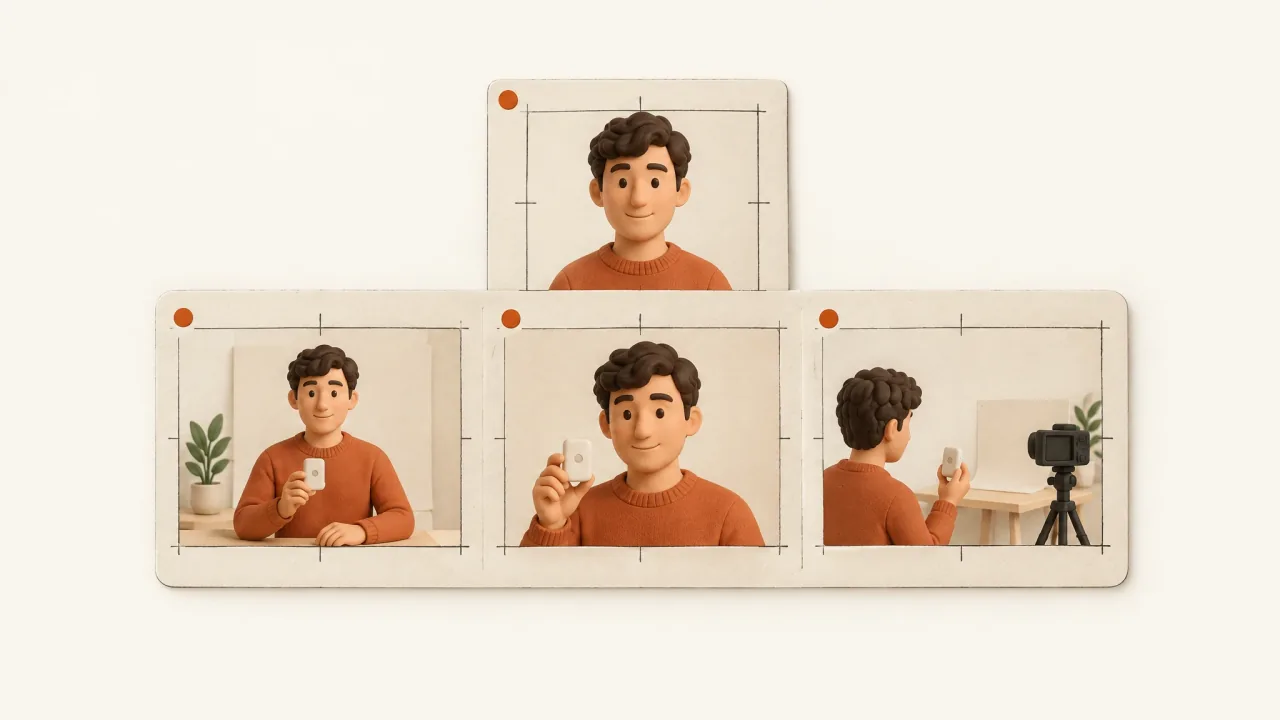
Plan the presenter once and give every scene the same instructions for identity, voice, wardrobe, and product state. Then review how the scenes join in the assembled video. Even a convincing scene can cut to what looks like a different person or a different situation.
Longer presenter videos are assembled from shorter scenes, so you need to plan and inspect continuity across them. One generation won't necessarily preserve every detail. Use a shared continuity sheet to record what stays fixed and which changes you've chosen deliberately.
Define the presenter as a role, not an invented customer
For a product explainer, the role might be “a fictional adult demonstrating a desk setup.” That supports category explanation and instructions based on supplied facts. It does not support a fabricated purchase history or personal result. First decide whether the message needs a presenter at all; continuity work should serve an explanation, not just keep a decorative speaker on screen.
The FTC's endorsement guidance says endorsements must be honest and not misleading. Showing the same generated face throughout an ad doesn't make that speaker a genuine customer.
Record where the presenter footage comes from. Native footage captures an actual performance; generated scenes are constructed illustrations. Product claims and customer experiences still need evidence from the appropriate authorized source, whatever the presenter's delivery sounds like.
Separate fixed identity from scene variation
Choose one approved identity reference before planning different environments. Describe features a reviewer can compare, such as the hair silhouette, facial proportions, glasses if present, and other distinctive visible details. A vague instruction such as “friendly professional” gives a mood but leaves the person's appearance unspecified.
Record wardrobe separately. A change in shirt colour, neckline, sleeve length, or accessories can look like a costume change even when the face stays similar. Decide which changes you want and give every scene the same instructions.
Decide what can vary, too. A closer camera angle can add emphasis while keeping the same identity. A new location can mark another chapter if the story establishes the move. Give each change a reason tied to the explanation. The proposed long-form VSL showcase organizes a longer sequence around chapters and a shared cast-and-scene reference.
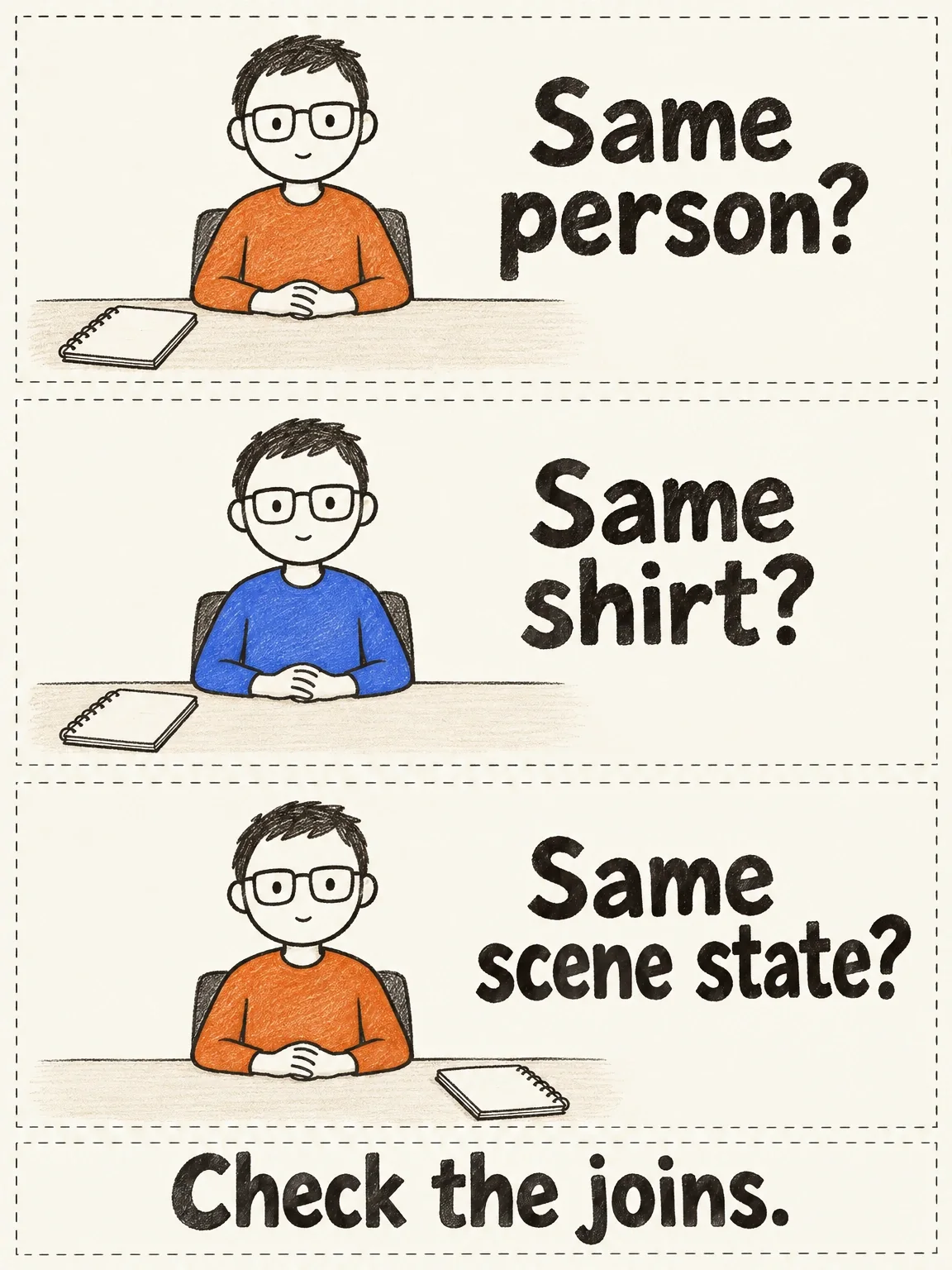
The shirt changed during the cut
The face stays the same, but the shirt and notebook drift. These deliberately inconsistent drawings give each continuity check something different to catch.
View full-size (opens in a new tab)Image explanation
- The fictional presenter keeps the same facial identity. The constructed shirt and notebook changes break the shared wardrobe and scene-state references.
- Inspect actual motion, speaking scenes and joins. A cutaway leaves unseen continuity unproven.
Build the continuity sheet before the scene briefs
Share this planning sheet with the customer and attach the actual authorized reference files. Fill in the bracketed fields; they aren't existing asset IDs.
Presenter role: [fictional explainer / authorized recorded speaker]
Identity authority: [approved reference files; exact version]
Fixed visible identity: [hair; facial proportions; glasses; other details]
Wardrobe and accessories: [colours; neckline; sleeves; visible items]
Voice authority: [approved sample or direction; permission where needed]
Language and delivery: [accent; conversational energy; speaking style]
Pronunciation guide: [product names and terms, written clearly]
Product authority: [exact variant; supplied references; approved facts]
Product state: [position; orientation; accessories; visible contents]
Setting anchors: [desk position; lighting direction; recurring props]
Allowed changes: [camera scale or location change; narrative reason]

For each planned speaking scene:
Scene job: [what this part explains]
Approved script: [proposed wording, not a final transcript]
Entry state: [pose; gaze; visible product state]
Exit state: [pose; gesture completion; visible product state]
Next transition: [direct cut / product insert / established change]
Preserve from shared sheet: [non-negotiable anchors]

Final inspection:
Identity and wardrobe: [actual observation after media returns]
Voice and pronunciation: [actual observation]
Product state and joins: [actual observation]
Selection or revision: [human decision; specific requested change]
Keep one shared sheet for the agreed details. If you change the wardrobe, update it before producing more scenes. Slightly different descriptions in separate briefs can leave a reviewer with conflicting instructions and no reliable way to choose between them.
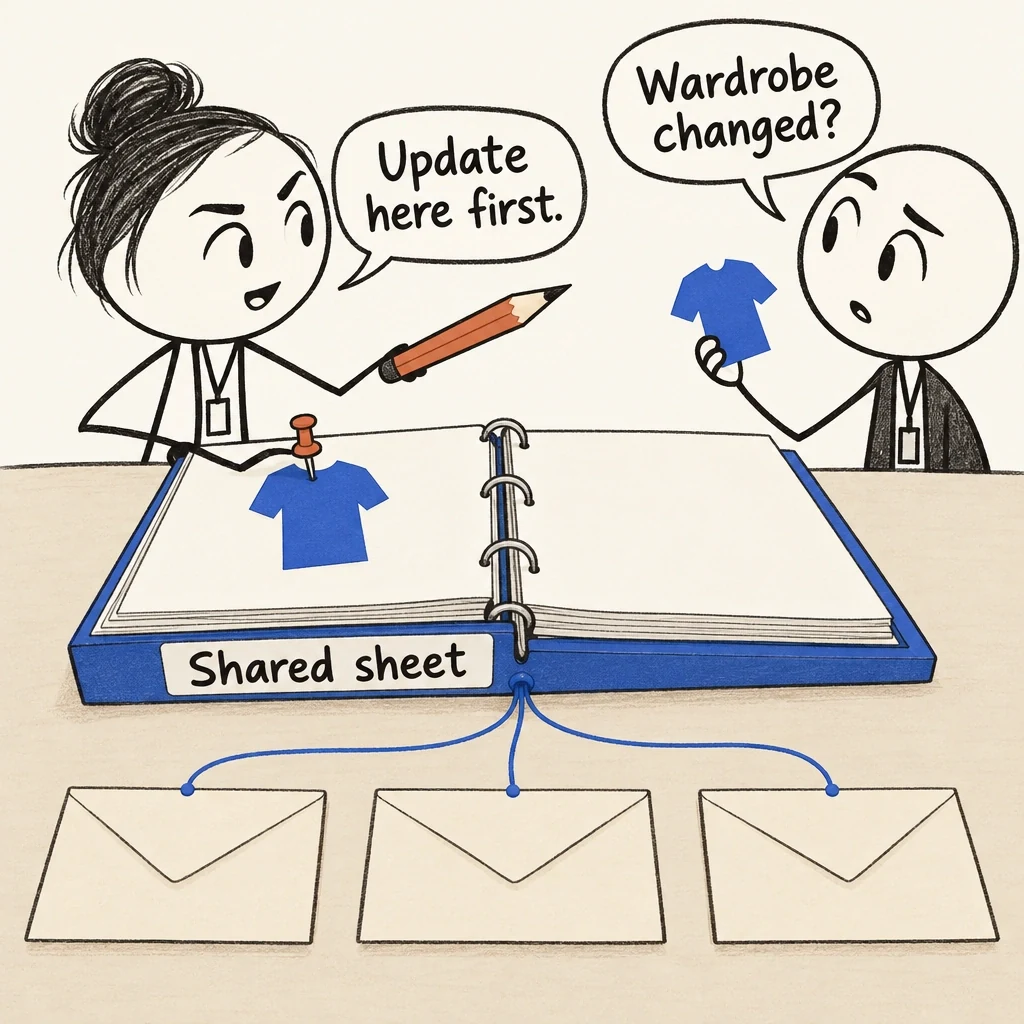
A wardrobe change belongs on the shared reference sheet first. Scene briefs can then draw from the same decision.
View full-size (opens in a new tab)Image explanation
- Keep one shared sheet for approved reference versions, visible identity, wardrobe, voice, pronunciation, product state, setting anchors and allowed changes. Scene briefs add their jobs, entry, exit and transition states.
- Update the shared sheet when a decision changes, before making more scenes from contradictory copied descriptions.
- The blank envelopes contain no rendered scenes. Shared instructions leave fidelity to be checked in actual speaking scenes, motion, voice and assembled joins against the supplied references, followed by final human selection.
A proposed three-speaking-scene sequence
Consider a fictional adult explaining a matte cobalt-blue, three-slot cable keeper. This is a pre-production plan. No longer presenter demonstration has been returned.
Opening speaking scene: the presenter sits at an ordinary desk and introduces switching between a phone and a work device. The keeper is visible at the desk edge, without a complicated hand action.
Middle speaking scene: after a product detail insert, the presenter explains the loose cable ends' resting place. Use the same shirt, voice direction, desk orientation, and product position. End the gesture before leaving the shot so the next cut does not create a mismatched movement.
Closing speaking scene: return to a closer view for the real Fablo invitation. Preserve identity and wardrobe; make the change in camera scale deliberate. Label the object as a fictional demonstration prop rather than suggesting it is available to buy.
The product insert needs its own identity check. It also creates a limit: a cable already resting in a slot explains the end state, but does not demonstrate generated insertion, grip, or release. If handling matters, brief and inspect it explicitly with the product-in-hand checklist.
Inspect joins as well as scenes
Compare clear frames from each speaking scene with the shared reference, then watch the movement. Check that the features remain consistent through a head turn or gesture, not just in the opening frame.
Listen across transitions for changes in accent, tone, pronunciation, or the sound of the recording. Music shouldn't conceal a voice change. After assembly, match speech captions to the words actually delivered, including any edits to the approved script.
Check the recurring environment and product state as well. If the keeper moves across the desk without explanation, or the cable arrangement changes between adjoining views, the video may imply an action it never shows. Match the states where continuity matters and explain changes the story requires.
A product-only cutaway can help explain the product, but it leaves the presenter's identity unassessed while they're off screen. Check continuity in the speaking scenes and in the assembled video. The insert alone can't show that a repair worked.
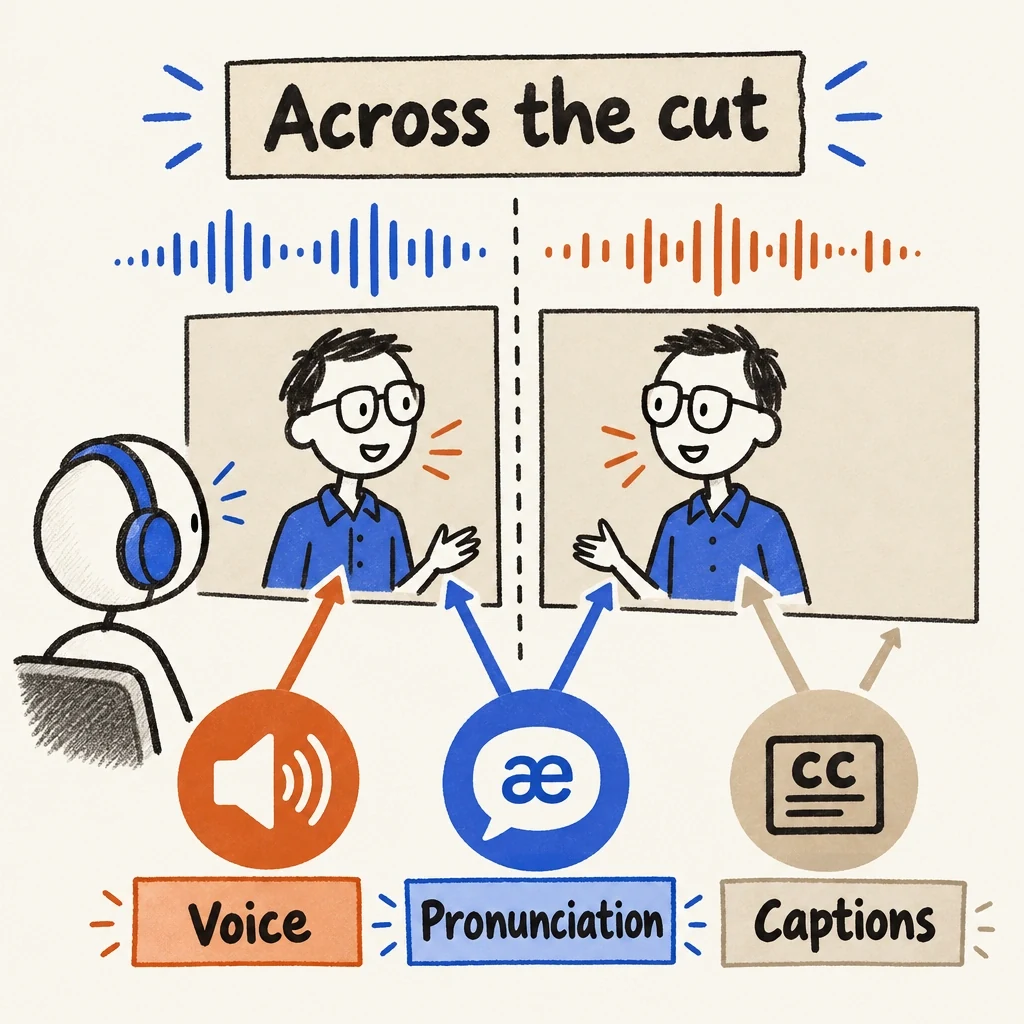
A matching face does not settle the voice join
Matching faces leave another continuity check to do: listen across the cut and compare the captions with the delivered speech.
View full-size (opens in a new tab)Image explanation
- Listen across transitions for a coherent accent, tone, pronunciation and recording character, even when the face matches.
- Check captions against the actual delivered words. Music supplies no evidence that the voice stayed consistent.
Make the revision narrower than the whole video
If a returned scene has the wrong shirt but usable identity and speech, ask for the wardrobe correction and say what to keep. For a pronunciation error, name the spoken term and recheck lip sync and captions after the change. A missing product demonstration needs a different request.
Define the change with the one-scene revision brief. Check the complete assembly afterward, since replacement footage can alter joins, sound, and product state. A person still needs to decide whether the sequence is acceptable. References don't guarantee perfect fidelity.
Complete the sheet, bring it to the product-ad workflow, and open Fablo to produce your presenter sequence. Fablo's recurring monthly credits fund scene production, checks, and corrections. Start with a clearly defined sequence and review its estimate before committing to a longer video.